

Page Objects Are Not Only For E2E
How to use the same page objects in unit and end-to-end tests.


Page Object
A page object is a class that serves as an interface to access elements and perform actions in end-to-end tests. For example:
test(“Create a todo”, () => {
  // `TodoPageObject` is a page object class
  const todoPo = new TodoPageObject(...);
  todoPo.enterNewTodo(“Learn about Page Objects”);
  todoPo.clickCreate();
  const todos = todoPo.getTodos();
  assert(todos.length).toBe(1);
});
The TodoPageObject is a class following the Page Object Model (or POM), a common design pattern in e2e tests.
Advantages
Page objects allow the decoupling of the interaction and access to UI elements from the test itself.
The advantages are:
Maintainability. When a UI element changes, we only need to change the code in one place, not in all the tests.
Reusability. Page objects are reused in multiple tests.
Readability. The code is easier to read.
Not Only E2E
Yet, many articles on page objects fail to mention that we can use them in unit or integration tests. This way, we also get all the goodies of page objects there.
To enable this, we need to extend POM with the following:
Component Object.
Enable multiple test environments with dependency injection.
Component Object
Any page is composed of multiple UI components. For example, let’s imagine we have the following structure:
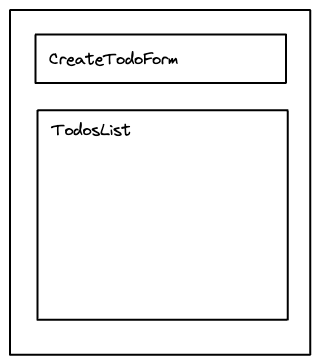
A Component Object is a class for each of the UI components. Then, the page object of the main page uses these “smaller” classes.
In the previous example, we have two main components inside the page: CreateTodoForm and TodosList. Therefore, we use those inside our TodoPageObject:
class CreateTodoComponentObject {...}

class TodosLisComponenttObject {...}

class TodoPageObject {
  enterNewTodo(todo) {
    this.createTodoFormPo.enter(todo);
  }
  // …
  getTodos() {
    return this.todosListPo.getTodos();
  }
}
At some point inside the TodoPageObject, we initialize a CreateTodoComponentObject and a TodosListComponentObject. Then we use those to perform the actions.
The main page object never accesses the UI elements directly but always through page component objects.
Enable Multiple Test Environments
Unit and E2E tests usually run in separate environments. Therefore, the way to access the UI elements is different.
For example, using Jest, we use the classic HTML document interface:
const input = document.querySelector(“input”);Yet, in Cypress, we select with another method:
cy.get(selector);The implementation of CreateTodoComponentObject would need to be different, and we’d lose the advantages of maintainability and reusability.
It doesn’t have to be this way.
Dependency Injection: Element
We need a standard interface that all page objects use to access UI elements. We implement this standard interface as a class; let’s call it the Element class. When we initialize a page object, depending on the environment, we use one implementation of the Element interface or another.
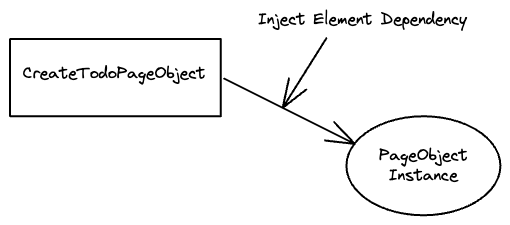
First, we define the interface, for example:
interface Element {
  select(selector: string): Element,
}
Then, we implement one per environment:
class JestElement extends Element {
  // …
}

class CyElement extends Element {
  //…
}
Most e2e test environments select elements asynchronously. That means that the interface should adapt to it:
interface Element {
  select(selector: string): Promise<Element>,
}
Inside the page objects, we need to use the shared interface:
Class TodosListComponentObject {

  // expect the dependency in the initialization
  constructor(element: Element) { … }

  getTodos() {
    // use Element interface “select” instead of the Jest or Cypress one
    return this.element.select(“.todo”);
  }
}
Then, in our E2E test, we first initialize the page element and then the page object:
// Cypress environment
test(“Create a todo”, () => {
  const element = new CyElement(...);
  const todoPo = new TodoPageObject(element);
  // …
});
Injecting the specific Element class as a dependency enables using page objects in multiple test environments.
Page Object Model For Unit Tests
This is an example of how we could use a component object in a unit test:
describe(“TodosList”, () => {
  it(“should render a todo item per todo in the state”, () => {
    // prepare state
    // ...

    // render the component
    // ...

    // create the Jest page element
    const element = new JestElement(...);

    // use the component object
    const todoPo = new TodosListComponentObject(element);
    const todos = todoPo.getTodos();
    expect(todos).toHaveLength(...);
  });
});
Recap
We learned how to use the Page Object Model (POM) in unit tests by implementing two additional classes:
Component Objects. A “small” page object.
Elements. The interface to access UI elements across multiple test environments.
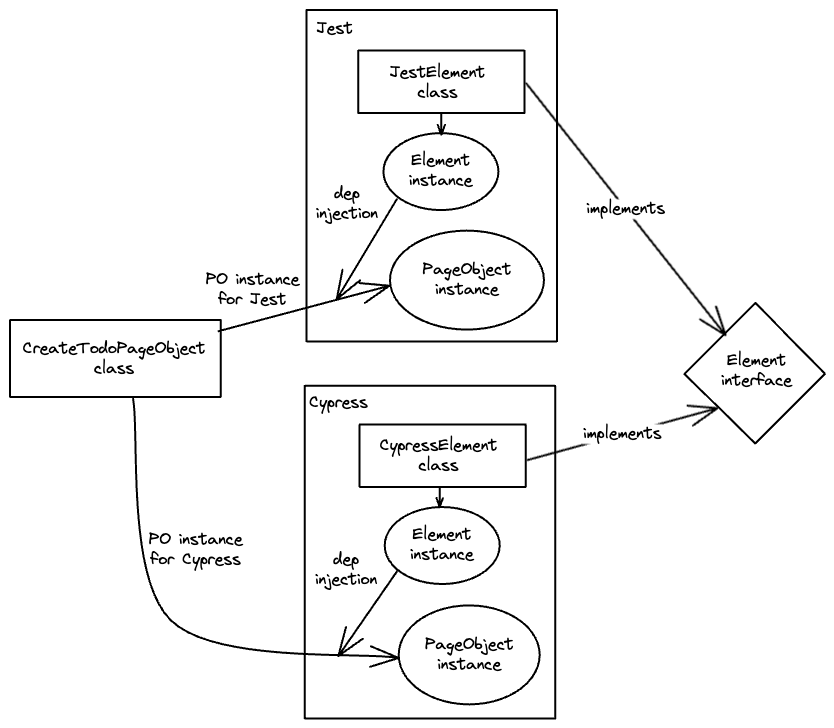
With this pattern, we not only have the advantages of POM in the E2E tests but also in our unit and integration tests.
Thanks to David de Kloet for introducing me to this pattern and reviewing the article.